
HP Integrated Lights-Out 2 Management Processor Scripting and Command Line Resource Guide
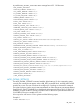
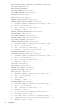
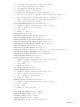
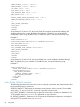
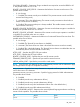
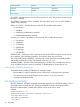
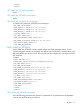
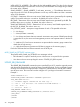
<SNMP_ADDRESS_2 value = "test"/>
<SNMP_ADDRESS_3 value = "dest"/>
<OS_TRAPS value = "Y"/>
<RIB_TRAPS value = "N"/>
<CIM_SECURITY_MASK value = "3"/>
<EMS_STATUS value = "Y" />
<BYPASS_POWER_CABLE_REPORTING value = "N" />
<SNMP_PASSTHROUGH_STATUS value = "Y" />
-->
</MOD_GLOBAL_SETTINGS>
</RIB_INFO>
</LOGIN>
</RIBCL>
As of release iLO 2 version 1.50, the Virtual Serial Port supports automatically enabling and
disabling software flow control. By default, this behavior is disabled. You can enable this
configuration option using the RIBCL only. To enable this option, execute the following script:
Example 2:
<RIBCL VERSION="2.0">
<LOGIN USER_LOGIN="Administrator" PASSWORD="password">
<RIB_INFO MODE="write">
<MOD_GLOBAL_SETTINGS>
<VSP_SOFTWARE_FLOW_CONTROL value="Yes"/>
</MOD_GLOBAL_SETTINGS>
<RESET_RIB />
</RIB_INFO>
</LOGIN>
</RIBCL>
As of release iLO 2 version 2.06, the Virtual Media port can be enabled or disabled through
RIBCL. By default, this port is enabled. To disable the port, execute the following script:
Example 3:
<RIBCL VERSION="2.0">
<LOGIN USER_LOGIN="Administrator" PASSWORD="password">
<RIB_INFO MODE="write">
<MOD_GLOBAL_SETTINGS>
<VMEDIA_DISABLE VALUE = "Yes"/>
</MOD_GLOBAL_SETTINGS>
</RIB_INFO>
</LOGIN>
</RIBCL>
MOD_GLOBAL_SETTINGS parameters
The following parameters are optional. If you do not specify a parameter, then the parameter value
for the specified setting is preserved.
SESSION_TIMEOUT – Determines the maximum session timeout value in minutes. The accepted
values are 0, 15, 30, 60, and 120. A value of 0 specifies infinite timeout.
ILO_FUNCT_ENABLED – Determines if the Lights-Out functionality is enabled or disabled for iLO
2. The possible values are yes or No. This parameter is case insensitive.
F8_PROMPT_ENABLED – determines if the F8 prompt for ROM-based configuration is displayed
during POST. The possible values are Yes or No.
94 Using RIBCL