
HP Integrated Lights-Out 2 Management Processor Scripting and Command Line Resource Guide
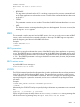
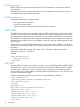
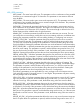
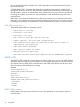
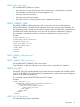
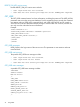
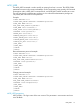
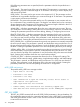
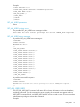
</USER_INFO>
</LOGIN>
</RIBCL>
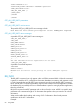
ADD_USER parameters
USER_NAME – The actual name of the user. This parameter can be a combination of any printable
characters up to a maximum length of 39 characters. This parameter is case sensitive and must
never be blank.
USER_LOGIN – The name used to gain access to the respective iLO 2. This parameter can be a
combination of any printable characters up to a maximum length of 39 characters. This parameter
is case sensitive and must never be blank.
PASSWORD – The password associated with the user. This parameter is case sensitive and can
be a combination of any printable characters. The length is user defined and can be a minimum
of zero characters and a maximum of 39 characters. The minimum length is defined in the iLO 2
Global Settings and has a default value of eight characters.
ADMIN_PRIV – A Boolean parameter that allows the user to administer user accounts. The user
can modify their account settings, modify other user account settings, add users, and delete users.
Omitting this parameter prevents the user from adding, deleting, or configuring user accounts.
REMOTE_CONS_PRIV – A Boolean parameter that gives permission for the user to access the
Remote Console functionality. This parameter is optional, and the Boolean string must be set to
yes if the user must have this privilege. If this parameter is used, the Boolean string value must
never be left blank. Omitting this parameter denies the user access to Remote Console functionality.
RESET_SERVER_PRIV – A Boolean parameter that gives the user permission to remotely manipulate
the server power setting. This parameter is optional, and the Boolean string must be set to yes if
the user must have this privilege. If this parameter is used, the Boolean string value must never be
left blank. Omitting this parameter prevents the user from manipulating the server power settings.
VIRTUAL_MEDIA_PRIV – A Boolean parameter that gives the user permission to access the virtual
media functionality. This parameter is optional, and the Boolean string must be set to yes if the
user must have this privilege. If this parameter is used, the Boolean string value must never be left
blank. Omitting this parameter denies the user virtual media privileges.
CONFIG_ILO_PRIV – A Boolean parameter that allows the user to configure iLO settings. This
privilege includes network settings, global settings, Insight Manager settings, and SNMP settings.
This parameter is optional, and the Boolean string must be set to yes if the user must have this
privilege. If this parameter is used, the Boolean string value must never be blank. Omitting this
parameter prevents the user from manipulating the current iLO 2 configuration.
The following parameters are not applicable to a user's privileges in the iLO firmware versions
1.40 and higher and iLO 2 firmware versions 1.1x and higher. The parameters will parse correctly,
but user privileges will not be affected.
VIEW_LOGS_PRIV – A Boolean parameter that gives the user permission to view the iLO 2 system
logs. This parameter is optional, and the Boolean string must be set to yes if the user must be
allowed to view logs. If this parameter is used, the Boolean string value must never be blank.
CLEAR_LOGS_PRIV – A Boolean parameter that gives the user permission to clear the event log.
This parameter is optional, and the Boolean string must be set to yes if the user must be allowed
to clear the iLO 2 event log. If this parameter is used, the Boolean string value must never be blank.
EMS_PRIV – A Boolean parameter that gives the user permission to use the Windows Server 2003
EMS service. This parameter is optional, and the Boolean string must be set to yes if the user must
be allowed to use EMS services. If this parameter is used, the Boolean string value must never be
blank.
UPDATE_ILO_PRIV – A Boolean parameter that allows the user to copy a new firmware image into
the iLO 2 system ROM. This parameter is optional, and the Boolean string must be set to Yes if
USER_INFO 73