
HP Integrated Lights-Out 2 Management Processor Scripting and Command Line Resource Guide
LOGIN parameters
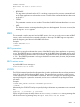
USER_LOGIN is the login name of the user account. This parameter is case sensitive and must
never be blank.
PASSWORD is the password associated with the user. This parameter is case sensitive and can
be a combination of any printable characters.
LOGIN runtime errors
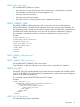
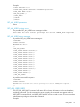
The possible runtime error messages include:
• User login name was not found.
• Password must not be blank.
• Logged-in user does not have required privilege for this command.
USER_INFO
The USER_INFO command can only appear within a LOGIN command block. When the command
is parsed, it reads the local user information database into memory and prepares to edit it. Only
commands that are USER_INFO type commands are valid inside the USER_INFO command block.
The USER_INFO command generates a response that indicates to the host application whether the
database was successfully read or not. If database is open for writing by another application, then
this call will fail.
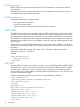
USER_INFO requires the MODE parameter with a value of read or write. MODE is a specific string
parameter with a maximum length of 10 characters that specifies what you intend to do with the
information.
Write mode enables both reading and writing of iLO 2 information. Read mode prevents
modification of the iLO 2 information.
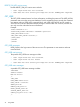
Example:
<USER_INFO MODE="write">
……… USER_INFO commands ……
</USER_INFO>
ADD_USER
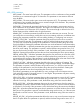
The ADD_USER command is used to add a local user account. The USER_NAME and USER_LOGIN
parameters must not exist in the current user database. Use the MOD_USER command to change
an existing user's information. For this command to parse correctly, the command must appear
within a USER_INFO command block, and USER_INFO MODE must be set to write. The user must
have the administrative privilege.
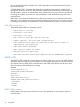
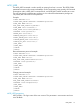
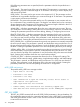
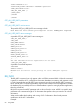
All of the attributes that pertain to the user are set using the following parameters.
<RIBCL VERSION="2.0">
<LOGIN USER_LOGIN="loginname" PASSWORD="password">
<USER_INFO MODE="write">
<ADD_USER
USER_NAME="User"
USER_LOGIN="username" PASSWORD="password">
<ADMIN_PRIV value ="No"/>
<REMOTE_CONS_PRIV value ="Yes"/>
<RESET_SERVER_PRIV value ="No"/>
<VIRTUAL_MEDIA_PRIV value ="No"/>
<CONFIG_ILO_PRIV value ="No"/>
</ADD_USER>
72 Using RIBCL