
HP Integrated Lights-Out 2 Management Processor Scripting and Command Line Resource Guide
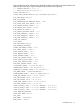
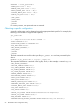
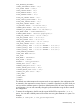
<REMOTE_KEYBOARD_MODEL VALUE="US"/>
<RBSU_POST_IP VALUE="Y"/>
<HIGH_PERFORMANCE_MOUSE VALUE="Automatic">
<REMOTE_CONSOLE_ACQUIRE VALUE="N"/>
</GET_GLOBAL_SETTINGS>
Setting a configuration
You can set a specific configuration by using the command format:
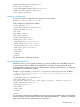
HPONCFG /f add_user.xml /l log.txt
In this example, the input file has contents:
<RIBCL VERSION="2.0">
<LOGIN USER_LOGIN="x" PASSWORD="x">
<USER_INFO MODE="write">
<ADD_USER
USER_NAME="Landy9"
USER_LOGIN="mandy8"
PASSWORD="floppyshoes">
<ADMIN_PRIV value ="No"/>
<REMOTE_CONS_PRIV value ="Yes"/>
<RESET_SERVER_PRIV value ="No"/>
<VIRTUAL_MEDIA_PRIV value ="No"/>
<CONFIG_ILO_PRIV value="Yes"/>
</ADD_USER>
</USER_INFO>
</LOGIN>
</RIBCL>
The specified user is added to the device.
Using variable substitution
HPONCFG version 1.2 and greater enables you to specify variables in the XML RIBCL script and
to assign values to those variables when HPONCFG is executed. This feature helps to avoid
rewriting the XML script file every time with different values. Anything enclosed by two '%' characters
in the XML file is considered a variable.
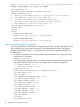
Example 1: In this example, %username%, %loginname%, and %password% are variables.
<!-- Add user with minimal privileges to test default setting of assigned privileges to 'N' -->
<RIBCL version="1.2">
<LOGIN USER_LOGIN="x" PASSWORD="x">
<USER_INFO MODE="write">
<ADD_USER USER_NAME="%username%" USER_LOGIN="%loginname%" PASSWORD="%password%">
<RESET_SERVER_PRIV value="Y" />
<ADMIN_PRIV value="Y" />
</ADD_USER>
</USER_INFO>
</LOGIN>
</RIBCL>
You can specify values for these variables at execution time using the substitute option. The argument
must be a string or variable name and value pairs separated by delimiter ',' (comma). The variable
name and its value must be separated by an equal sign (=).
HPONCFG utility 67