
HP Integrated Lights-Out 2 Management Processor Scripting and Command Line Resource Guide
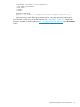
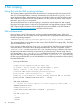
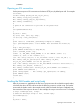
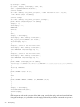
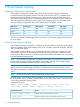
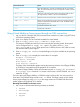
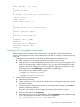

ResultCommand Line Input
Ejects the media that is currently connected through the virtual media
drive. The virtual media drive is still connected, but no media is present
in the drive.
[-eject]
Defines the write-protected status of the Virtual Floppy/USB key drive.
This argument has no effect on the Virtual CD-ROM drive.
[-wp <y | n>]
Defines how the virtual media drive is used to boot the target server.
[-boot <once | always | never>]
Defines which management processor is being used with LOVM utility.
If RILOE is specified, the VFLOP.EXE utility is used. The default setting
of this argument is iLO 2.
[-mgmt <ilo | riloe>]
Displays the HPLOVM utility version.
[-ver]
Displays help information.
[-?]
Using Virtual Media on Linux servers through an SSH connection
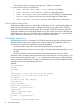
1. Log in to the iLO 2 through SSH (SSH connection from another Linux system, using PuTTY from
a Windows operating system).
2. Enter vm to display a list of commands available for Virtual Media.
3. Enter vm floppy insert http://<address>/<image-name>.
The image is available to boot from, but is not seen by the operating system. Boot options
can be configured with vm floppy set <option>, the options are boot_once,
boot_always, and no_boot). Boot options from a USB key drive are only valid on servers
with ProLiant USB key drive support.
4. Enter vm floppy set connect to make the floppy or key drive available to the operating
system.
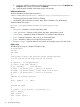
5. Enter vm floppy get to display the current status. For example:
VM Applet = Disconnected
Boot Option = BOOT_ONCE
Write Protect = Yes
Image Inserted = Connected
The status of the Virtual Media applet is always disconnected, unless a Virtual Floppy/USBKey
or CD-ROM is connected through the graphical iLO 2 interface.
The Virtual Floppy/USBKey can be disconnected using the vm floppy set disconnect
or vm floppy eject commands. To connect or disconnect a Virtual CD-ROM, use cdrom
instead of floppy.
The link to the Virtual Floppy/USBKey or CD-ROM image must be a URL. You cannot specify a
drive letter. The CD-ROM image must be in the .iso format. The floppy image can be created
from a physical floppy by using rawrite or the image creation tool included with the Virtual
Media applet in the graphical iLO 2 interface.
Mounting Virtual Media on the Linux server:
1. Use lsmod to check that the following modules are loaded:
• usbcore
• usb-storage
• usb-ohci
• sd_mod
Using Virtual Media on Linux servers through an SSH connection 57