
HP Integrated Lights-Out 2 Management Processor Scripting and Command Line Resource Guide


7 Virtual Media scripting
Scripting Web server requirements
Virtual Media scripting uses a media image that is stored and retrieved from a Web server
accessible from the management network. The web server must be a HTTP 1.1 compliant server
that supports the Range header. Furthermore, for write access to the file, the Web server must
support DAV and must support the Content-Range header for DAV transactions. If the Web server
does not meet the requirements for DAV, a helper CGI program may be used. The Web server
may optionally be configured for basic HTTP authentication SSL support, or both.
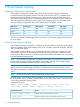
SSL SupportAuthorizationWrite SupportRead SupportWeb Server
Not TestedNot testedYes*YesMicrosoft IIS 5.0
YesYesYesYesApache
YesYesYesYesApache/Win32
*IIS does not support Content-Range for DAV transactions. A CGI helper program must be used
for write support.
Using virtual media scripting
Virtual media scripting is a method for controlling virtual media devices without going through the
browser. Scriptable virtual media supports insert, eject, and status commands for floppy, USB key,
and CD/DVD-ROM images.
Virtual media scripting enables you to use methods other than a browser to configure iLO 2 for
virtual media use. iLO 2 can be configured remotely using CPQLOCFG XML commands, locally
using HPONCFG XML commands, or locally using the HPLOVM utility that replaces the VFLOP utility
from the SmartStart Scripting toolkit.
NOTE: Virtual media scripting does not operate Virtual Media using the browser. Likewise, the
browser does not support scripting capabilities. For example, a floppy disk mounted using the
browser cannot later be dismounted using the scripting interface.
The XML commands enable you to configure virtual media in the same manner as the virtual media
applet. However, the actual image is located on a Web server on the same network as iLO 2.
After the image location is configured, iLO 2 retrieves the virtual media data directly from the web
server.
NOTE: USB key drives must be used with the floppy keyword syntax.
HPLOVM.EXE is a new scripting utility that enables you to script insert, eject, and set boot options
for virtual media devices. HPLOVM is intended to be used in place of the VFLOP.exe utility, which
is part of the SmartStart Scripting Toolkit.
Command line syntax:
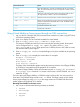
HPLOVM [-device <floppy | cdrom>] [-insert <url>] [-eject] [-wp <y | n>]
[-boot <once | always | never>] [-mgmt <ilo | riloe>] [-ver] [-?]
ResultCommand Line Input
Defines which virtual media device is active.
[-device <floppy | cdrom>]
Defines the location of the virtual media image to connect.
[-insert <url>]
56 Virtual Media scripting