
HP Integrated Lights-Out 2 Management Processor Scripting and Command Line Resource Guide


</LOCFG>
Opening an SSL connection
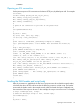
Perl scripts must open an SSL connection to the device HTTPS port, by default port 443. For example:
use Socket;
use Net::SSLeay qw(die_now die_if_ssl_error);
Net::SSLeay::load_error_strings();
Net::SSLeay::SSLeay_add_ssl_algorithms();
Net::SSLeay::randomize();
#
# opens an ssl connection to port 443 of the passed host
#
sub openSSLconnection($)
{
my $host = shift;
my ($ctx, $ssl, $sin, $ip, $nip);
if (not $ip = inet_aton($host))
{
print "$host is a DNS Name, performing lookup\n" if $debug;
$ip = gethostbyname($host) or die "ERROR: Host $hostname not found.\n";
}
$nip = inet_ntoa($ip);
print STDERR "Connecting to $nip:443\n";
$sin = sockaddr_in(443, $ip);
socket (S, &AF_INET, &SOCK_STREAM, 0) or die "ERROR: socket: $!";
connect (S, $sin) or die "connect: $!";
$ctx = Net::SSLeay::CTX_new() or die_now("ERROR: Failed to create SSL_CTX $! ");
Net::SSLeay::CTX_set_options($ctx, &Net::SSLeay::OP_ALL);
die_if_ssl_error("ERROR: ssl ctx set options");
$ssl = Net::SSLeay::new($ctx) or die_now("ERROR: Failed to create SSL $!");
Net::SSLeay::set_fd($ssl, fileno(S));
Net::SSLeay::connect($ssl) and die_if_ssl_error("ERROR: ssl connect");
print STDERR 'SSL Connected ';
print 'Using Cipher: ' . Net::SSLeay::get_cipher($ssl) if $debug;
print STDERR "\n\n";
return $ssl;
}
Sending the XML header and script body
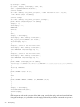
After the connection is established, the first line of script sent must be an XML document header,
which tells the device HTTPS web server that the following content is an XML script. The header
must match the header used in the example exactly. After the header has been completely sent,
the remainder of the script can be sent. In this example, the script is sent all at once. For example:
# usage: sendscript(host, script)
# sends the xmlscript script to host, returns reply
sub sendscript($$)
{
my $host = shift;
Opening an SSL connection 53