
HP Integrated Lights-Out 2 Management Processor Scripting and Command Line Resource Guide
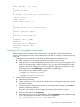

<WEB_AGENT_IP_ADDRESS value=%WebAgent%/>
</MOD_SNMP_IM_SETTINGS>
</RIB_INFO>
</LOGIN>
</RIBCL>
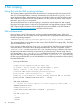
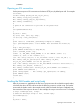
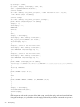
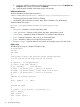
Invoke the script using:
cpqlocfg -s <iLO-ip-name> -f mod_snmp_im_settings.xml -t WebAgent='"Your_Value_Here"'
When replacing a token that requires double quotes, use single quotes around the token.
For information on the syntax of the XML data file, see “Using RIBCL” (page 70). Sample XML
scripts are available on the HP website at http://www.hp.com/servers/lights-out in the Best Practices
section.
Lights-Out Configuration Utility parameters 51