
HP Integrated Lights-Out 2 Management Processor Scripting and Command Line Resource Guide

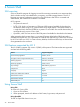
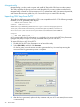
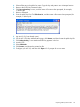
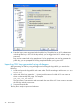

16. Enter the logon name associated with the public key. The public key in iLO 2 authenticates
with the private key in PuTTY. If the keys match, you are logged into iLO 2 without using a
password.
Keys can be created with a key passphrase. If a key passphrase was used to generate the
public key, you are prompted for the key passphrase before you log into iLO 2.
Importing SSH keys generated using ssh-keygen
After generating an SSH key using ssh-keygen and creating the key.pub file, you must do the
following:
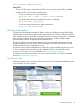
1. Locate and open the key.pub file with a text editor. The file must begin with the text ssh-dss
or ssh-rsa.
2. At the end of the line, append a " " (space) and the name of a valid iLO 2 user name as
shown on the Modify User page. For example:
xxx_some_text_xxx ASmith
The user name is case-sensitive and must match the case of the iLO 2 user name to associate
the SSH key with the correct user.
3. Save and close the file.
The key file is ready to import and authorize.
46 Secure Shell