
HP Integrated Lights-Out 2 Management Processor Scripting and Command Line Resource Guide
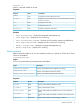
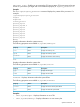
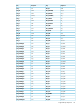

DescriptionTarget
Displays the minimum average power reading from the past 24 hours.
oemhp_MinPower
Displays and modifies the warning type.
warning_type
Displays and modifies the warning threshold for power consumption.
warning_threshold
Displays and modifies the duration the power threshold must be exceeded before
a warning is generated.
warning_duration
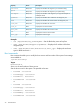
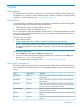
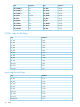
The following properties are available in /system1.
DescriptionAccessProperty
Displays the system name.Read
name
Displays the system serial number.Read
number
Displays the host server name string. This string can be up to 50
characters in length, and requires the configure iLO 2 privilege
to change.
Read
oemhp_server_name
Appears if the server is powered up.Read
enabledstate
Displays the setting for dynamic power saver mode. Valid values
are dynamic, min, max, and os.
Read/write
oemhp_powerreg
Displays the number of logical processors in the system.Read
processor_number
Displays the number of p-states supported by the server.Read
pstate_number
Displays the current power cap of the server. The value is shown
in watts.
Read/write
oemhp_pwrcap
You cannot set this property when a dynamic power cap is set for
the Enclosure. Enclosure Dynamic Power Caps is set and modified
using either Onboard Administrator or Insight Power Manager.
Displays the version and current state of the power micro option.Read
oemhp_power_micro_ver
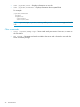
Examples
• show /system1
• show /system1 name
• set /system1 oemhp_powergov=auto
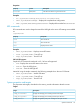
The cpu property is a target of /system1 and displays information about the system processor.
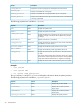
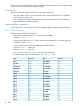
The following properties are available in /system1/cpu<n>:
DescriptionAccessProperty
Displays the processor speed.Read
speed
Displays the size of the processor
level-1 cache.
Read
cachememory1
Displays the size of the processor
level-2 cache.
Read
cachememory2
Displays the logical processor.Readlogical_processor<n>
34 Command line