
HP Integrated Lights-Out 2 Management Processor Scripting and Command Line Resource Guide
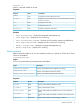
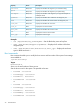
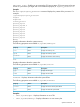
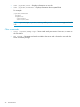
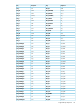
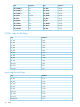

DescriptionAccessProperty
Displays and modifies the diagnostic port autoselect setting.Read/write
autoselect
Displays and modifies the diagnostic port speed setting.Read/write
speed
Displays and modifies if the diagnostic port supports full-duplex or
half-duplex mode.
Read/write
fullduplex
Displays and modifies the IP address for the diagnostic port.Read/write
ipaddress
Displays and modifies the subnet mask for the diagnostic port.Read/write
mask
Displays and modifies the rack name.Read/write
rack_name
Displays the rack serial number.Read
rack_sn
Displays and modifies the enclosure name.Read/write
encl_name
Displays the enclosure serial number.Read
ser
Displays the enclosure type.Read
encl_type
Examples
• set /map1/blade1/bay_name=BayOne – Sets the blade bay name to BayOne.
• show /map1/blade1/diagport1/ipaddress – Displays the IP address of the front
diagnostic port.
• show /map1/blade1/rack1/enclosure1(n)/encl_type – Displays the enclosure
type for blade enclosure n.
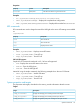
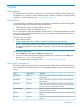
Boot commands
Boot commands enable you to modify the boot source and boot order of the system. Boot settings
are available at:
/system1/bootconfig1
Targets
bootsource1..n,
where n is the total number of boot sources.
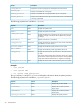
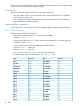
Sets the boot source for the system. The possible values are:
• BootFmCd : bootsource1
• BootFmFloppy : bootsource2
• BootFmDrive : bootsource3
• BootFmNetwork : bootsource4
or
• BootFmCd : bootsource1
• BootFmFloppy : bootsource2
• BootFmDrive : bootsource3
• BootFmUSBKey : bootsource4
• BootFmNetwork : bootsource5
32 Command line