
HP Integrated Lights-Out 2 Management Processor Scripting and Command Line Resource Guide
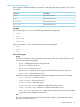

You can define additional groups using additional set commands.
You can specify one or more properties on the command line. If multiple properties are on the
same command line, then they must be separated by a space. For example:
• set /map1/oemhp_dircfg1
• set /map1/oemhp_dircfg1 oemhp_dirauth=default_schema
oemhp_dirsrvaddr=adserv.demo.com
Virtual media commands
Access to the iLO 2 virtual media is supported through the CLP. The virtual media subsystem is
located at:
/map1/oemhp_vm1
Targets
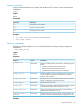
You can access the following sub-components of the virtual media.
DescriptionTarget
Virtual floppy or key drive device
/map1/oemhp_vm1/floppydr1
Virtual CD-ROM device
/map1/oemhp_vm1/cddr1
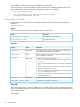
Properties
DescriptionAccessProperty
The image path and name for virtual media access. The value is a
URL with a maximum length of 80 characters.
Read/Write
oemhp_image
Displays if a virtual media device is already connected through the
CLP or scriptable virtual media.
Read
oemhp_connect
Sets the boot flag. The valid values are:Read/Write
oemhp_boot
• Never – Do not boot from the device. The value is displayed as
No_Boot.
• Once – Boot from the device only once. The value is displayed as
Once.
• Always – Boot from the device each time the server is rebooted.
The value is displayed as Always.
• Connect – Connect the virtual media device. Sets oemhp_connect
to Yes and oemhp_boot to Always.
• Disconnect – Disconnects the virtual media device and sets the
oemhp_boot to No_Boot.
Enables or disables the write-protect flag. Boolean values accepted.Read/Write
oemhp_wp
Indicates if the Java applet is connected.Read
oemhp_applet_connected
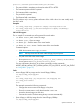
Image URL
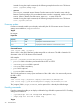
The oemhp image value is a URL. The URL, which is limited to 80 characters, specifies the location
of the virtual media image file on an HTTP server and is in the same format as the scriptable virtual
media image location.
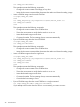
URL example:
26 Command line