
HP Integrated Lights-Out 2 Management Processor Scripting and Command Line Resource Guide
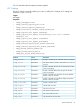

Targets
• Fan
• Sensor
• Power supply
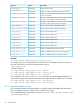
Properties
DescriptionAccessProperty
Displays fan, sensor, or power supply label numberRead
DeviceID
Displays fan, sensor, or power supply locationRead
ElementName
Displays fan, sensor, or power supply operational statusRead
Operationalstatus
Displays if fan is operating at variable speedRead
VariableSpeed
Displays the current fan speedRead
Desired Speed
Displays the health status of the fan, sensor, or power supplyRead
HealthState
Displays the reading units for temperature and voltage sensorsRead
RateUnits
Displays the current reading of sensorRead
CurrentReading
Displays the sensor typeRead
SensorType
Displays temperature sensor caution valueRead
Oemhp_CautionValue
Displays temperature sensor critical valueRead
Oemhp_CriticalValue
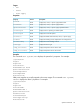
Examples
The command show system1/fan1 displays the system fan1 properties. For example:
/system1/fan1
Targets
Properties
DeviceID=Fan 1
ElementName=I/O Board
OperationalStatus=Ok
VariableSpeed=Yes
DesiredSpeed=40
HealthState=Ok.
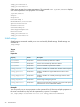
VRM power supplies are usually mapped to the sensor targets. The command show system1/
sensor1 displays the VRM 1 properties. For example:
/system1/sensor1
Targets
Properties
DeviceID=VRM 1
ElementName=CPU 1
OperationalStatus=Ok
RateUnits=Volts
CurrentReading=0
SensorType=Voltage
HealthState=Ok
Specific commands 23