
HP Integrated Lights-Out 2 Management Processor Scripting and Command Line Resource Guide
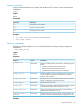
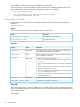
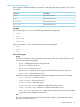
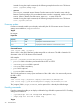

DescriptionAccessProperty
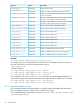
Sets the SSH port value.Read/Write
oemhp_sshport
Enables or disables SSH. Boolean values are accepted.Read/Write
oemhp_sshstatus
Enables or disables CLP session through serial port. Boolean
values are accepted.
Read/Write
oemhp_serialclistatus
Enables or disables authorization requirement for CLP session
through serial port. Boolean values are accepted.
Read/Write
oemhp_serialcliauth
Sets the serial port speed for the CLP session. The valid values
are 9600, 19200, 38400, 57600, and 115200.
Read/Write
oemhp_serialclispeed
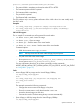
Sets the minimum password length requirement.Read/Write
oemhp_minpwdlen
Sets the logging criteria for failed authentications.Read/Write
oemhp_authfailurelogging
Sets the value for hotkey Ctrl+T.Read/Write
oemhp_hotkey_t
Sets the value for hotkey Ctrl+U.Read/Write
oemhp_hotkey_u
Sets the value for hotkey Ctrl+V.Read/Write
oemhp_hotkey_v
Sets the value for hotkey Ctrl+W.Read/Write
oemhp_hotkey_w
Sets the value for hotkey Ctrl+X.Read/Write
oemhp_hotkey_x
Sets the value for hotkey Ctrl+Y.Read/Write
oemhp_hotkey_y
Enables or disables high performance mouse.Read/Write
oemhp_high_perf_mouse
Enables or disables the Remote Console Computer Lock.Read/Write
oemhp_computer_lock
Enable or disable enforcing AES/3DES encryptionRead/Write
oemhp_enforce_aes
Examples
set /map1/config1 oemhp_enable=yes oemhp_timeout=30
You can specify one or more properties in the command line. If multiple properties are given on
the same command line, they must be separated by a space.
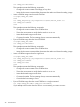
oemhp_computer_lock
command examples:
set /map1/config1 oemhp_computer_lock = windows
set /map1/config1 oemhp_computer_lock = custom,l_gui,l
set /map1/config1 oemhp_computer_lock = disabled
For a complete list of oemhp_computer_lock custom keys, see the HP Integrated Lights-Out 2
User Guide. Any keys with a space must have the space replaced with an underscore. For example:
set /map1/config1 oemhp_computer_lock = custom,SYS_RQ
set /map1/config1 oemhp_computer_lock = custom,SYS_RQ
iLO 2 embedded health settings
iLO 2 embedded health commands enable you to display system embedded health information
for fans, temperature sensors, voltage sensors, and the power supply.
iLO 2 embedded health CLP settings are located at /system1/fan*, /system1/sensor*, and
/system1/powersupply*.
22 Command line