
HP Integrated Lights-Out 2 Management Processor Scripting and Command Line Resource Guide
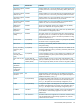

SNMP/Insight Manager settings parameters
DefinitionDefault ValueParameter
Enter the IP address of the remote management PC that will
receive SNMP trap alerts from the iLO 2. Up to three IP
addresses can be designated to receive SNMP alerts.
NoSNMP alert destination(s)
The iLO 2 alert conditions are detected by the iLO 2 and are
independent of the host server operating system. These alerts
NoEnable iLO 2 SNMP alerts
can be Insight Manager SNMP traps. These alerts include major
events, such as remote server power outages or server resets.
They also include the iLO 2 events, such as security disabled
or failed login attempt. The iLO 2 forwards the alerts to an HP
SIMconsole using the destinations provided.
When set to yes, these alerts are generated by the Insight
Management agents, which are provided for each supported
NoForward Insight Manager
Agent SNMP alerts
network operating system. The agents must be installed on the
host server to receive these alerts. These alerts are sent to HP
SIM clients on the network and are forwarded asynchronously
by the iLO 2 to the IP addresses that have been configured to
receive them.
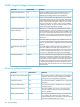
The Enable SNMP pass-through option enables the system to
pass SNMP packets from the Insight Management Agent. When
YesEnable SNMP pass-thru
set to No, all SNMP traffic is stopped and will not pass-through
the iLO 2.
The Insight Manager Web Agent URL option enables you to
enter the IP address or the DNS name of the host server on
Insight Manager Web Agent
URL
which the Insight Manager Web Agents are running. Entering
this data in the field provided enables iLO 2 to create a link
from the iLO 2 Web pages to the pages of the Web Agent.
The Level of Data Returned option regulates how much data is
returned to an anonymous request for the iLO 2 information
MediumLevel of data returned
from HP SIM. All settings, except the None Data Level, provide
sufficient data to allow integration with HP SIM. The Medium
and High settings enable HP SIM and Systems Insight Manager
to associate the management processor with the host server.
The None Data Level prevents the iLO 2 from responding to the
HP SIM requests.
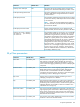
Directory settings parameters
DefinitionDefault valueParameter
This parameter enables or disables directory authentication.
If directory support is properly configured, this enables
user login to iLO 2 using directory credentials.
NoDisable directory authentication
This parameter enables or disables the use of schema-free
directories.
YesSchema-free directory
This parameter enables or disables the use of extended
schema directories.
NoUse HP extended schema
This option enables a user to log in using a local user
account instead of a directory account. By default, this
setting is Enabled.
YesEnable local user accounts
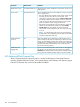
This parameter specifies the Directory Server DNS name
or IP address. HP recommends using a DNS name or
0.0.0.0Directory server address
multi-host DNS name. If an IP address is used, the directory
will not be available if that server is down.
162 iLO 2 parameters