
HP Integrated Lights-Out 2 Management Processor Scripting and Command Line Resource Guide
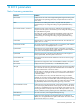
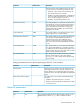

DefinitionDefault valueParameter
disabled, you must assign a static IP address to the iLO 2. Assign the
IP address using the iLO 2 IP address parameter.
Enables you to select static IP (disabled) or Enables the use of a DHCP
server to obtain an IP address for the iLO 2 subsystem.
YesDHCP
You cannot set the iLO 2 IP address and subnet mask if DHCP is
enabled.
Enabling DHCP allows you to configure the following DHCP options:
• Use DHCP Supplied Gateway
• Use DHCP Supplied DNS Servers
• Use DHCP Supplied WINS Servers
• Use DHCP Supplied Static Routes
• Use DHCP Supplied Domain Name
Use this parameter to assign a static IP address to the iLO 2 on your
network. By default, the IP address is assigned by DHCP.
N/A (DHCP)IP address
Use the subnet mask parameter to assign the subnet mask for the default
gateway. By default, the subnet mask is assigned by DHCP.
N/A (DHCP)Subnet mask
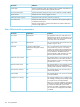
Use the gateway parameter to assign the IP address of the network
router that connects the iLO 2 subnet to another subnet where the
N/A (DHCP)Gateway IP address
management console resides. By default, the gateway is assigned by
DHCP.
The iLO 2 comes preset with a DNS/WINS name. The DNS/WINS
name is "iLO 2" plus the serial number of the server. This name also
iLO 2XXXXXXXXXXXX,
where the 12 Xs are the
iLO 2 subsystem
name
is displayed on the tag attached to the bracket of iLO 2. You can
change this value.
server serial number
(assigned at the factory)
Enter the name of the domain in which iLO 2 participates. By default,
the domain name is assigned by DHCP.
N/A (DHCP)Domain name
Configures the duplex of the network transceiver.AutomaticLink
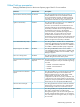
Network DHCP/DNS parameters
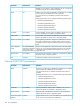
DefinitionDefault valueParameter
Enables you to select static IP (disabled) or enables the use of a DHCP
server to obtain an IP address for iLO 2 subsystem.
EnabledDHCP
You cannot set the iLO 2 IP address and subnet mask if DHCP is
enabled.
Enabling DHCP allows you to configure the following DHCP options:
• Use DHCP Supplied Gateway
• Use DHCP Supplied DNS Servers
• Use DHCP Supplied WINS Servers
• Use DHCP Supplied Static Routes
• Use DHCP Supplied Domain Name
Use this parameter to assign a static IP address to iLO 2 on your
network. By default, the IP address is assigned by DHCP.
N/A (DHCP)IP Address
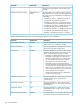
Enter the name of the domain in which iLO 2 will participate. By
default, the domain name is assigned by DHCP.
N/A (DHCP)Domain Name
Toggles whether the iLO 2 will use the DHCP server-supplied gateway.
If not, enter one in the Gateway IP Address box.
EnabledUse DHCP supplied
gateway
160 iLO 2 parameters