
HP Integrated Lights-Out 2 Management Processor Scripting and Command Line Resource Guide
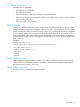
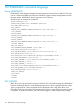
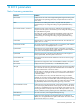
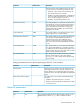

DescriptionsDefault valueParameter
To force the browser to refresh, save this setting, and
press F5.
This setting allows you to configure logging criteria for
failed authentications. All login types are supported and
Enabled-Every 3rd
Failure
Authentication Failure Logging
every login type works independently. The following are
valid settings:
• Enabled-Every Failure – A failed login log entry is
recorded after every failed login attempt.
• Enabled-Every 2nd Failure – A failed login log entry
is recorded after every second failed login attempt.
• Enabled-Every 3rd Failure – A failed login log entry is
recorded after every third failed login attempt.
• Enabled-Every 5th Failure – A failed login log entry is
recorded after every fifth failed login attempt.
• Disabled – No failed login log entry is recorded.
Settings (parameters) found on the Services page of the iLO 2 user interface.
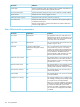
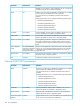
DescriptionDefault valueParameter
This setting enables you to specify whether the SSH
feature on the iLO 2 is enabled or disabled.
EnabledSecure Shell (SSH) Access
This setting enables you to configure the iLO 2 SSH
port to be used for SSH communications.
22Secure shell (SSH) Port
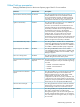
This setting enables you to connect a Telnet client to
the Remote Console/Telnet port, providing access to
the iLO 2 CLP. The following settings are valid:
DisabledTelnet Access
• EnablediLO 2 enables Telnet clients to connect to
the Remote Console/Telnet port. Network port
scanners can detect that iLO 2 is listening on this
port. Unencrypted communication is allowed
between the iLO 2 CLP and Telnet clients.
• DisablediLO 2 does not allow Telnet clients to
connect to the Remote Console/Telnet port. Network
port scanners will not normally detect if this port is
open on iLO 2. iLO 2 listens on this port for a few
seconds when the Remote Console is opened, but
Telnet connections are not accepted.
Communication between the iLO 2 and Remote
Console is always encrypted.
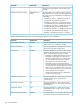
This setting enables you to specify which port the iLO
2 Remote Console uses for remote console
communications.
23Remote Console/Telnet Port
This setting enables you to specify which port the
embedded web server in iLO 2 uses for unencrypted
communications.
80Web Server Non-SSL Port
This setting enables you to specify which port the
embedded web server in iLO 2 uses for encrypted
communications.
443Web Server SSL Port
This setting enables you to control the ability to support
a connection through iLO 2 between a Microsoft
DisabledTerminal Services Passthrough
158 iLO 2 parameters