
HP Integrated Lights-Out 2 Management Processor Scripting and Command Line Resource Guide

Global Settings parameters
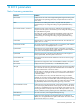
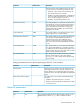
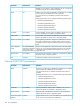
Settings (parameters) found on the Access Options page of the iLO 2 user interface.
DescriptionsDefault valueParameter
This setting specifies the interval of user inactivity, in
minutes, before the web server and Remote Console
30 minutesIdle Connection Timeout (minutes)
session automatically terminate. The following settings
are valid: 15, 30, 60, 120 minutes, or 0 (infinite). The
infinite timeout value does not log out inactive users.
This setting enables connection to iLO 2. If disabled, all
connections to iLO 2 are prevented.
EnabledLights-Out Functionality
The iLO 2 10/100 network and communications with
operating system drivers are turned off if Lights-Out
functionality is disabled. The iLO 2 Diagnostic Port for an
HP ProLiant BL p Class server is also disabled.
If iLO 2 functionality is disabled (including the iLO 2
Diagnostic Port), you must use the server's Security
Override Switch to enable iLO 2. See your server
documentation to locate the Security Override Switch and
set it to override. Power up the server and use the iLO 2
RBSU to set Lights-Out Functionality to Enabled.
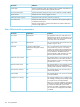
This setting enables or disables the iLO 2 ROM-Based
Setup Utility. Normally, the iLO2 Option ROM prompts
EnablediLO 2 ROM-Based Setup Utility
you to press F8 to enter RBSU, but if iLO 2 is disabled or
iLO 2 RBSU is disabled, the RBSU prompt is bypassed.
This setting enables RBSU access with or without a
user-credentials challenge. If this setting is Enabled, and
DisabledRequire Login for iLO 2 RBSU
you press F8 during POST to enter iLO 2 RBSU, a login
dialog box appears.
This setting enables the display of the iLO 2 network IP
address during the host server POST process.
DisabledShow iLO 2 during POST
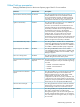
This setting enables you to change the login model of the
CLI feature through the serial port. The following settings
are valid:
Enabled-Authentication
Required
Serial Command Line Interface
Status
• Enabled – Authentication Required
• Enabled – No Authentication
• Disabled
This setting enables you to use the serial port to change
the speed of the serial port for the CLI feature. The
9600Serial Command Line Interface
Speed
following speeds (in bits/s) are valid: 9600, 19200,
38400, 57600, and 115200. The serial port
configuration must be set to No parity, 8 data bits, and
1 stop bit (N/8/1) for proper operation. The serial port
speed that is set by this parameter must match the speed
of the serial port set in the System ROM RBSU setup.
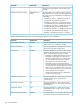
This setting specifies the minimum number of characters
allowed when a user password is set or changed. The
character length can be set at a value from 0 to 39.
8Minimum Password Length
This setting enables you to specify the host server name.
This value is assigned when using HP ProLiant
Server Name
Management Agents. If you do not use the agents and
the host unnamed message appears, you can change it
here. If the agents are running, the value you assign can
be overwritten.
Global Settings parameters 157