
HP Integrated Lights-Out 2 Management Processor Scripting and Command Line Resource Guide

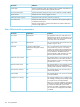
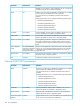

DefinitionParameter
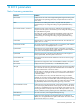
Displays whether the system has a feature license installed. Some features of
iLO 2 cannot be accessed unless optionally licensed.
License Type
Displays information about the version of iLO 2 firmware currently installed.iLO 2 Firmware Version
Displays the users currently logged into iLO 2.Active Sessions
Displays the most recent entry in the iLO 2 event log.Latest iLO 2 Event Log Entry
Displays the date (MM/DD/YYYY) as indicated by the Integrated Lights-Out
2 subsystem internal clock.
iLO 2 Date/Time
The iLO 2 internal clock is synchronized with the host system at POST and
when the Insight Agents run.
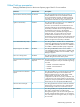
User Administration parameters
DefinitionDefault valueParameter
This parameter is the user's real name as it is
displayed in the user list and event log. It is not
AdministratorUser name
the name used to log in. The maximum length
of the user name is 39 characters.
This is a case-sensitive name that the user must
provide to log in to iLO 2.
AdministratorLogin name
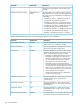
This is a case-sensitive password that the user
must provide to log in to iLO 2. In Security
A random, eight-character
alphanumeric string that is factory
assigned
Password
Options, the minimum password length can be
assigned. The minimum password can be from
0 to 39 characters. The default minimum
password length is eight characters. You must
enter the password twice for verification.
This privilege allows a user to add, modify, and
delete user accounts. It also allows the user to
YesAdminister user accounts
alter privileges for all users, including granting
all permissions to a user.
This privilege allows a user to remotely manage
the Remote Console of a managed system,
including video, keyboard, and mouse controls.
YesRemote console access
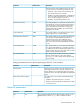
This privilege allows a user to power-cycle or
reset the host platform.
YesVirtual power and reset
This privilege allows a user to use virtual media
on the host platform.
YesVirtual media
This privilege enables a user to configure most
iLO 2 settings, including security settings. It does
not include user account administration.
YesConfigure iLO 2 settings
After iLO 2 is correctly configured, revoking this
privilege from all users prevents reconfiguration.
A user with the Administer User Accounts
privilege can enable or disable this privilege.
iLO 2 can also be reconfigured if iLO 2 RBSU
is enabled.
156 iLO 2 parameters