
HP Integrated Lights-Out 2 Management Processor Scripting and Command Line Resource Guide
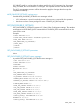
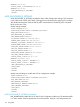
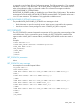
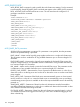
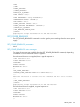
<VRM>
</VRM>
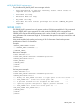
<POWER_SUPPLIES>
</POWER_SUPPLIES>
<HEALTH_AT_A_GLANCE>
<FANS STATUS= "Ok"/>
<FANS REDUNDANCY= "Fully Redundant"/>
<TEMPERATURE STATUS= "FAILED"/>
<VRM STATUS= "Ok"/>
<POWER_SUPPLIES STATUS= "Ok"/>
<POWER_SUPPLIES REDUNDANCY= "unknown"/>
</HEALTH_AT_A_GLANCE>
</GET_EMBEDDED_HEALTH_DATA>
</RIBCL>
cpqlocfg.exe: Script succeeded on "16.100.000.192:000"
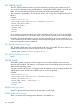
GET_POWER_READINGS
The GET_POWER_READINGS command is used to get the power readings from the server power
supply.
GET_POWER_READINGS parameters
None
GET_POWER_READINGS return messages
Two types of responses are available from the GET_POWER_READINGS command, depending
on whether or not an advanced license is applied.
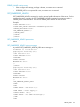
If an advanced license is not applied, then a typical response is:
<?xml version="1.0"?>
<RIBCL VERSION="2.22">
<RESPONSE
STATUS="0x0000"
MESSAGE='No error'
/>
<GET_POWER_READINGS>
<PRESENT_POWER_READING VALUE="275" UNIT="Watts"/>
<!--
Additional information is available with iLO 2 Advanced and iLO 2 Select licenses.
-->
</GET_POWER_READINGS>
</RIBCL>
cpqlocfg.exe: Script succeeded on "16.100.100.100:100"
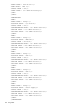
If an advanced license is applied, a typical response is:
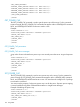
<?xml version="1.0"?>
<RIBCL VERSION="2.22">
<RESPONSE
STATUS="0x0000"
MESSAGE='No error'
/>
SERVER_INFO 129