
HP Integrated Lights-Out 2 Management Processor Scripting and Command Line Resource Guide
MOD_BLADE_RACK
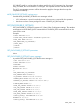
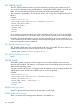
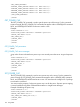
MOD_BLADE_RACK command is used to modify the rack infrastructure settings. For this command
to parse properly, the MOD_BLADE_RACK command must appear within a RACK_INFO command
block, and RACK_INFO MODE must be set to write. The user must have the configure iLO 2
privilege to execute this command.
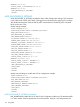
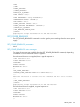
Example:
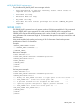
<RIBCL VERSION="2.0">
<LOGIN USER_LOGIN="adminname" PASSWORD="password">
<RACK_INFO MODE="write">
<MOD_BLADE_RACK>
<RACK_NAME value="CPQ_Rack_1"/>
<ENCLOSURE_NAME value="CPQ_Enclosure_1"/>
<BAY_NAME value="CPQ_Bay_5"/>
<FACILITY_PWR_SOURCE value="Yes"/>
<RACK_AUTO_PWR value="Yes"/>
<SNMP_RACK_ALERTS value="Yes"/>
<LOG_RACK_ALERTS value="Yes"/>
</MOD_BLADE_RACK>
</RACK_INFO>
</LOGIN>
</RIBCL>
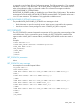
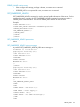
MOD_BLADE_RACK parameters
All of the following parameters are optional. If a parameter is not specified, then the parameter
value for the specified setting is preserved.
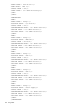
RACK_NAME – Name used to logically group together enclosures in a single rack infrastructure.
This parameter can be a combination of any printable characters up to a maximum length of 31
characters.
ENCLOSURE_NAME – Name used to logically group together the ProLiant BL-Class servers that
compose a single enclosure. This parameter can be a combination of any printable characters up
to a maximum length of 31 characters.
BAY_NAME – Name used to identify a particular ProLiant BL-Class server. This parameter can be
a combination of any printable characters up to a maximum length of 31 characters.
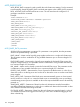
FACILITY_PWR_SOURCE – Determines the source of power for the blade servers. A value of Yes
directs the server to use facility power and a value of No directs the server to use the server blade
power supplies.
RACK_AUTO_PWR – Determines if the blade server must automatically power on when inserted
into the enclosure. A value of Yes causes the blade server to automatically power up and begin
normal booting process if power is available. A value of No requires the blade server to be manually
powered on.
SNMP_RACK_ALERTS – Determines if alerts from the rack infrastructure must be forwarded to
user-defined SNMP trap destinations. A value of Yes enables rack alerts to be forwarded. A value
of No disables rack alerts from being forwarded.
LOG_RACK_ALERTS – Determines if alerts from the rack infrastructure must be logged. A value of
Yes enables rack alerts to be logged in the IML log. A value of No disables the logging of rack
alerts in the IML log.
124 Using RIBCL