
HP Integrated Lights-Out 2 Management Processor Scripting and Command Line Resource Guide
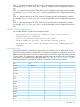
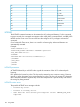

;e0F2
'f1F3
L_CTRLg2F4
R_CTRLh3F5
NUM PLUSi4F6
NUM MINUSj5F7
SCRL LCKk6F8
BACKSPACEl7F9
SYS RQm8F10
n9F11
LICENSE
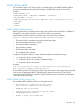
The LICENSE command activates or deactivates the iLO's advanced features. For this command
to parse correctly, the command must appear within a RIB_INFO command block, and RIB_INFO
MODE must be set to write. The user must have the configure iLO 2 privilege to execute this
command.
On a ProLiant BL Class server, there is no need for a licensing key. Advanced features are
automatically activated.
Example:
<RIBCL VERSION="2.0">
<LOGIN USER_LOGIN="adminname" PASSWORD="password">
<RIB_INFO MODE="write">
<LICENSE>
<ACTIVATE KEY="1111122222333334444455555"/>
</LICENSE>
</RIB_INFO>
</LOGIN>
</RIBCL>
LICENSE parameters
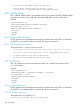
ACTIVATE followed by a valid KEY value signals the activation of the iLO 2 advanced pack
licensing.
KEY specifies the license key value. The key must be entered as one continuous string. Commas,
periods, or other characters must not separate the key value. The key only accepts 25 characters;
other characters entered to separate key values are interpreted as a part of the key and result in
the wrong key being entered.
LICENSE runtime errors
The possible LICENSE error messages include:
• License key error.
• License is already active.
• User does not have correct privilege for action. CONFIG_ILO_PRIV
required.
102 Using RIBCL