
HP Integrated Lights-Out 2 Management Processor Scripting and Command Line Resource Guide
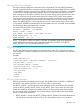
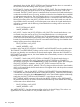
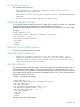
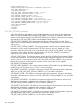
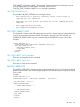

CTRL_V – Specifies settings for the CTRL_V hot key. The settings must be separated by commas.
For example, CTRL_V="CTRL,ALT,ESC." Up to five keystrokes can be configured for each hot
key.
CTRL_W – Specifies settings for the CTRL_W hot key. The settings must be separated by commas.
For example, CTRL_W="CTRL,ALT,ESC." Up to five keystrokes can be configured for each hot
key.
CTRL_X – Specifies settings for the CTRL_X hot key. The settings must be separated by commas.
For example, CTRL_X="CTRL,ALT,ESC." Up to five keystrokes can be configured for each hot
key.
CTRL_Y – Specifies settings for the CTRL_Y hot key. The settings must be separated by commas.
For example, CTRL_Y="CTRL,ALT,ESC." Up to five keystrokes can be configured for each hot
key.
HOTKEY_CONFIG runtime errors
The possible HOTKEY_CONFIG error messages include:
• RIB information is open for read-only access. Write access is
required for this operation.
• The hot key parameter specified is not valid.
• Invalid number of hot keys. The maximum allowed is five.
• User does not have correct privilege for action. CONFIG_ILO_PRIV
required.
Supported hot keys
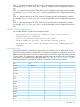
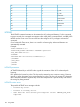
The Program Remote Console Hot Keys page allows you to define up to six different sets of hot
keys for use during a Remote Console session. Each hot key represents a combination of up to five
different keys which are sent to the host machine whenever the hot key is pressed during a Remote
Console session. The selected key combination (all keys pressed at the same time) are transmitted
in its place. For a complete list of supported hotkeys, see “Supported hot keys” (page 101). The
following table lists keys available to combine in a Remote Console hot key sequence.
o:F12ESC
p<" " (Space)L_ALT
q>!R_ALT
r=#L_SHIFT
s?$R_SHIFT
t@%INS
u[&DEL
v]~HOME
w\(END
x^)PG UP
y_*PG DN
za+ENTER
{b-TAB
}c.BREAK
|d/F1
RIB_INFO 101