
HP Intelligent Management Center v7.0 VAN Fabric Manager Administrator Guide

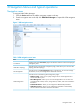
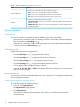
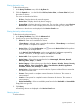
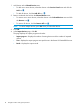
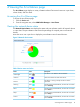

Table 1 VFM navigation menu items (continued)
FunctionItem
Provides access to the following LAN configuration pages:
LAN Configuration
• TRILL—Allows you to manage TRILL networks and devices.
• SPB—Allows you to manage SPB networks devices, and services.
• EVI—Allows you to manage EVI networks, devices, and services.
Provides access to the following statistics pages:
Statistics
• ECT Statistics Chart—Allows you to view the number of B-VLANs and the number of
I-SIDs for each ECT.
• VM Migration Info—Allows you to view the VM migration records and play back the
migration processes.
Typical operations
Sorting a list
You can sort a list by every field that contains a Sort icon in the column label.
• When the list is sorted by a field in ascending order, the column label of the selected field is
blue and contains an Ascending icon .
• When the list is sorted by a field in descending order, the column label of the selected field
is blue and contains a Descending icon .
Navigating a list
Use the following items to navigate the list:
• Click the Next Page icon to page forward in the list.
• Click the Last Page icon to page forward to the end of the list.
• Click the Previous Page icon to page backward in the list.
• Click the First Page icon to page backward to the front of the list.
• Click a page number to display the page in the list.
• Select 8, 15, 50, 100, 200, or 1000 at the bottom of the list to configure how many items per
page you want to display.
Importing devices
You can import devices from the IMC Platform to VFM, or from the DC management module to the
service management module.
Accessing the window for selecting devices
To access the window for selecting devices:
1. In the list, click Import Devices.
The Import Devices page appears.
2. Click Select Devices.
The window for selecting devices appears, from which you can filter devices by view or
advanced query.
16 Navigation Menus and typical operations