
HP Intelligent Management Center v7.0 VAN Fabric Manager Administrator Guide


3 Navigation Menus and typical operations
Navigation menu
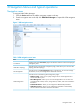
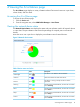
To navigate VAN Fabric Manager:
1. Click the Service tab from the tabular navigation system on the top.
2. From the navigation tree on the left, click VAN Fabric Manager to expand the VFM navigation
menu.
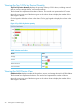
Figure 1 VFM navigation menu
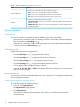
Table 1 VFM navigation menu items
FunctionItem
Provides access to the At a Glance page for the statistics of devices and network topologies
managed by VFM.
At a Glance
Provides access to the topology management page, which allows you to view the LAN
topology and SAN topology.
VAN Fabric Topology
Provides access to the DC management page to manage DCs. You can also manage
the switches, servers, and storage devices contained in the DCs.
DC Management
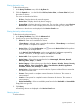
Provides access to the following SAN configuration pages:
SAN Configuration
• SAN Fast Config—Allows you to quickly configure servers and storage devices to
access each other in pairs.
• Fabric Management—Allows you to view and manage fabrics. You can also view
and manage the switches, servers, storage devices, VSANs, and zones contained in
the fabrics.
• Default DCBX Params—Allows you to configure the default DCBX parameters.
• VSAN Auto Discovery—Allows you to configure the parameters to automatically
discover VSANs and switches contained in the fabrics.
Navigation menu 15