
HP ProLiant Cluster HA/F500 for Enterprise Virtual Array Enhanced DT Supplement Guide






Cluster Installation
Setting Up the Fibre Channel Switches at Both Locations,
if Applicable
NOTE: Both Fibre Channel switches can be configured from the same site.
Your Fibre Channel switches must be installed and configured with two working
redundant fabrics before you connect the remaining Continuous Access EVA
components to your fabrics. For information on the specific switches used and GBICs
needed, refer to http://h18006.www1.hp.com/storage/saninfrastructure.html.
Controller-to-Switch Connections
Before connecting fiber optic cables between storage components, HP recommends
that you tag each end to identify switch names, port numbers, controller names,
and so on.
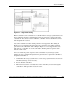
Four fiber optic cable connections are required for each controller pair. The only
supported connection scheme is shown in Figure 2-1. Connect the fiber optic cable
such that port 1 of controller A and controller B go to different fabrics. Connect
port 2 of controller A and controller B to separate fabrics that are the fabric opposite
from port 1 on that controller.
The basic rule is that the first or left-hand port on the top controller is cabled to the
first fabric and the other port of the same controller is cabled to the other fabric. The
other (bottom) controller is cabled such that the left-hand port is attached to the
second fabric, while the second port is cabled to the first fabric, the opposite of the
first (top) controller. Even though it does not matter which switch ports are used,
symmetry is recommended.
2-6 HP ProLiant Cluster HA/F500 for Enterprise Virtual Array Enhanced DT Supplement Guide
HP CONFIDENTIAL
Writer: Woody Jernigan File Name: c-ch2 Cluster Installation.doc
Codename: 49ers IV Part Number: 339223-002 Last Saved On: 9/30/03 10:46 AM