
HP ProLiant Cluster HA/F500 for Enterprise Virtual Array Enhanced DT Supplement Guide







Cluster Installation
Pre-presenting the Destination VDs to Cluster Nodes
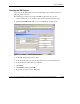
1. In the hp openview storage management appliance window, select Devices. The
Devices window displays.
Figure 2-21: Devices window
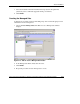
2. Click command view eva. The command view eva Properties window opens.
3. In the navigation pane, select the destination subsystem, and then click Virtual
Disks.
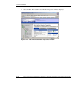
4. Select the virtual disk to present on the destination subsystem.
HP ProLiant Cluster HA/F500 for Enterprise Virtual Array Enhanced DT Supplement Guide 2-33
HP CONFIDENTIAL
Writer: Woody Jernigan File Name: c-ch2 Cluster Installation.doc
Codename: 49ers IV Part Number: 339223-002 Last Saved On: 9/30/03 10:46 AM