
HP ProLiant Cluster HA/F500 for Enterprise Virtual Array Enhanced DT Supplement Guide







Cluster Installation
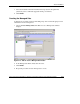
5. In the navigation pane, select the first DR group to be part of a managed set.
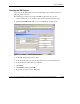
6. In the Configuration dropdown menu, select Edit. The Edit an existing DR
Group window displays.
Figure 2-20: Edit an existing DR Group window
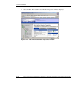
7. Select a managed set from the Managed Set list, and then click Finish.
8. Repeat steps 5 through 7 for each DR group to add.
2-32 HP ProLiant Cluster HA/F500 for Enterprise Virtual Array Enhanced DT Supplement Guide
HP CONFIDENTIAL
Writer: Woody Jernigan File Name: c-ch2 Cluster Installation.doc
Codename: 49ers IV Part Number: 339223-002 Last Saved On: 9/30/03 10:46 AM