
HP ProLiant Cluster HA/F500 for Enterprise Virtual Array Enhanced DT Supplement Guide





Cluster Installation
8. Click Finish, and then click OK (if the operation was successful).
NOTE: If the operation is not successful, it typically is caused by a communication problem.
Verify the SAN connection, fix the problem, and begin again at step 1.
Creating the VD folders
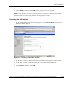
1. In the Command View EVA navigation pane, click Virtual Disks. The Create a
Folder window displays.
Figure 2-6: Creating a VD Folder window
2. In the Step 1: Enter a Name field, enter the folder name (use the cluster name).
3. In the Step 2: Enter comments field, enter any additional information.
4. Click Finish, and then click OK.
HP ProLiant Cluster HA/F500 for Enterprise Virtual Array Enhanced DT Supplement Guide 2-17
HP CONFIDENTIAL
Writer: Woody Jernigan File Name: c-ch2 Cluster Installation.doc
Codename: 49ers IV Part Number: 339223-002 Last Saved On: 9/30/03 10:46 AM