
Insight Environmental Configuration User Guide






Creating a project 9
Creating a project
Starting a new configuration project
The Configurator software associates a configuration project to a specific monitored data center.
Therefore, if you have more than one data center monitored on the same server, then each data center
must have its own configuration project.
You must configure each project and individually export each project to the server before the installation
is complete and the sensors report data to the Observer software.
To start an HP Insight Environmental Configurator project and send the configuration to Observer:
1. Select Start.
2. In the HP Insight Environmental Configurator menu, select HP Insight Environmental Configurator.
3. Choose one of the following options:
o Select File>New project.
o Press Ctrl+N.
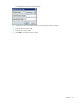
A window appears prompting you to select a background image. For more information, see Adding
the background image (on page 9).
Adding the background image
For information about creating a background image, see the Appendix (on page 107).
NOTE: The background image file must be saved in PNG format to upload as the
background for your Configurator project.
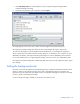
To add a background image: