
Insight Environmental Configuration User Guide





Creating a project 89
2.
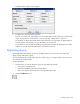
Select the General tab.
3. Select the general view options you wish to see on your floor plan:
o Orientation arrows
o Background image
o Highlight associations on hover
4. Select Name on/off to display the object name on the floor plan. If you want the name to appear,
select whether you want the object Name or the MacID displayed.
5. Select one of the following options:
o Apply—To save the changes and continue to work in the View Options window
o OK—To save the changes and close the View Options window
o Close—To close the window without saving the changes