
Insight Environmental Configuration User Guide





Creating a project 86
2.
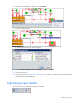
Select the rack object and move the mouse to the intake side of the rack. The arrow moves in 45
degree increments. To set the rack to any angle, hold down the Ctrl key while moving the mouse.
3. Click your mouse again when the arrow points to the correct direction to finalize the rotation.
Associating reference temperature
Reference temperature is the temperature of the cold air in the plenum nearest the rack, used to calculate
certain metric measurements. Some rack sensors do not calculate the metrics and do not require a
reference temperature.
To associate two sensor objects:
1. Select the Associate tool icon.
NOTE: For best reference temperature results, associate the object with the temperature
sensor closest to the rack sub-floor.
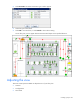
2. On the floor plan, select the object that requires a reference temperature. Then, select a second
sensor object, to be used as the reference temperature. A solid line appears between the two sensor
objects.
3. Repeat for all objects that require a reference temperature.
Associating PUE objects
The PUE objects are all used to compute metric power data. Each PUE object is then associated to the
PUE Reporter object, which computes your power efficiency for the data center at large. To compute the
power data, you must associate the objects of the data center to specific PUE objects.
To associate an object to a PUE object:
1. On the floor plan, right click the object icon. The right-click menu appears.
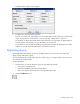
NOTE: The Association Type window reflects the type of association you are creating and
appears different for each type of association.