
Insight Environmental Configuration User Guide





Creating a project 84
3.
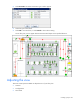
Select the location on the floor plan where you want the duplicated objects placed.
4. If you need to move the objects after you have placed them, then select the Select tool icon and drag
the objects to the correct location.
Assigning MAC IDs
A physical ID is a unique, 16-digit, hexadecimal number, also called a MAC ID. Each base station has a
different physical ID.
The MAC ID property for an object in your floor plan associates that object in the system with a specific
base station in your data center. All base stations configured and powered on within the range of a
gateway can join the network only after their MAC IDs are associated with an object in the Configurator
floor plan.
All objects must have MAC IDs entered in the Configurator floor plan before the project can be exported
to the system database. However, if you want to assess your project design before you install the
hardware in your data center, you can enter false IDs. A simple warning is issued.
You can assign a MAC ID in one of the following ways:
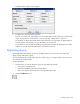
• To assign a MAC ID using the Select tool:
a. Locate the MAC ID on the bar code of the base station.
b. Select the base station using the Select tool.