
Insight Environmental Configuration User Guide





Creating a project 83
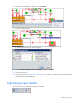
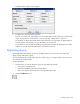
The Quick Name settings window appears
3. Configure up to three incremental variables.
Numeric #1, Numeric #2, and Alpha #1 are all variables that increment each time you select a new
object. The first selection would be Rack 1, the next selection would be Rack 2, and so on.
The variables can be incremented at different rates and have a varying number of digits (width). For
example, Rack 01 has a width of 2, while Rack 0001 has a width of 4.
The variables can also use different padding. Using the Alpha variable with padding set to A and a
width set to 4 would name racks Rack AAA1, Rack AAA2, and so on.
Duplicating objects
Duplicating objects can speed up the process of adding objects to your floor plan, especially in the
design of large data center projects.
You can either duplicate a single object, such as a pressure object, or multiple objects, such as an entire
row of identically monitored racks.
To duplicate objects:
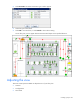
1. Select all items you want to duplicate, using one of the following methods:
o Drag a box around the objects.
o Hold down the Ctrl key while selecting each object.
o Select each object from the Zone tree on the right side of the screen.
2. Select the Duplicate tool icon.