
Insight Environmental Configuration User Guide






Overview 7
• Advanced—(Default) Permission to export new or updated configuration data to the Edge server.
• Expert—Permission to export new or update configuration data to the Edge server, change user
access codes, clear object IDs, export configuration files to XML, or remove existing configuration
data from the Edge server.
Some menus and menu options are only available if you are using Advanced or Expert user credentials.
To change a user level:
1. From the Setup menu, select Change User Level.
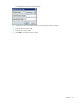
The Change User Level window appears.
2. Select the user level from the menu.
3. Enter the access code, and select OK.
NOTE: The access codes are considered local to the Configurator software. Therefore, if you
move the project file to another machine or server, then you still have full access to the project
file as long as you enter the correct access code.
Each user level is controlled by an access code. The default access code for an Advanced or Expert user
is 1234. Only an Expert user can change the access code.
To change the access code:
1. From the Setup menu, select Change User Level Access Code.