
Insight Environmental Configuration User Guide





Creating a project 69
6.
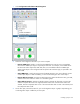
Select object whose data you want view on the Custom Metrics tab. A graphic representing your
inspector object and its associated object is added to your floor plan.
The Select Association Type window appears.
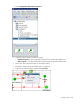
7. Select Inspected Power Resulting Sum, and then select OK.
An arrow appears to show the association on your floor plan.
Configuring PUE data
You must configure PUE data in Configurator before it can appear in HP Insight Environmental Observer.
The following sections are examples of different configuration options for PUE data.
Configuring power loss
You must configure PDU Input Power ("Configuring PDU Input Power" on page 71) and PDU Loss
Coeffcient ("Configuring PDU Loss Coefficient" on page 73) before you can configure total Power Loss.
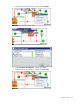
1. Select Calculations>Power Calculations>Multiplication.
2. On the floor plan, select the location for your multiplication object.
3. Rename the multiplication object Power Loss.