
Insight Environmental Configuration User Guide





Creating a project 66
1.
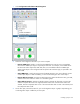
Select Configurations>Calculations>Wired Integration.
2. Select the wired integration calculation you want to compute:
o Numeric SNMP Input—Gathers a value from the SNMP device's OID to input in to PUE data.
One Numeric SNMP Input object is required per OID value. For example, if one SNMP device
has three OID values required for PUE data, then you must add three Numeric SNMP Input
objects. Each object is then configured with the specific OID and Data Type, as specified in the
device MIB.
o Status SNMP Input—Verifies the energy status of SNMP equipment. You cannot directly connect
a status input object to a PUE calculation; you must connect through a value switch object.
o Numeric Web Service Input—Executes an XPath expression against the document at a given URI,
and then returns the result as a number to a calculation graph.
o Status Web Service Input—Executes an XPath expression against the document at a given URI
and then compares the result to the supplied whitelist value. If the returned value exists in the
whitelist, then the component status is On. If the returned value does not exist in the whitelist, then
the component status is Off.
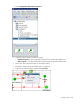
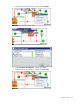
3. On the floor plan, select the location for your wired integration object. A graphic representing your
wired integration object is added to your floor plan.