
Insight Environmental Configuration User Guide





Creating a project 65
o
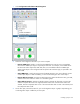
Input value switch—A status input for a power meter, which detects whether the equipment is on
or off. When the equipment is on, a value is calculated and sent to the PUE Reporter. When the
equipment is off, the Default Value (0.0) is sent.
o Status inverter—Inverts a status input from off to on, or vice versa.
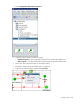
3. On the floor plan, select the location for your calculation object. A graphic representing your
calculation object is added to your floor plan.
4. Create PUE associations ("Associating PUE objects" on page 86) to the objects whose data you
want to compute.
Adding wired integration
NOTE: PUE objects are symbolic and do not represent a physical device within the data
center.
Wired integration calculates the power consumption or loss from SNMP-based or web services-based
devices. You can add more than one wired integration object to your floor plan.
NOTE: An SNMP data source is required for each SNMP device.
To add a wired integration object to your floor plan: