
Insight Environmental Configuration User Guide





Creating a project 62
4.
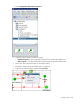
Select the Association icon, then select the object you want to calculate.
5. Select the new calculation object you just added to associate that object to the calculation object.
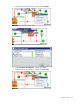
For example, if you add a Log 10 calculation object to your floor plan to calculate the common
logarithm of a specific object, you would select the association icon, then select the object you want
to calculate, and lastly select the new Log 10 calculation object.
You can use the output of one calculation object as an input to another calculation or PUE reporter
object. Instead of selecting an object for your input value, you would select the calculation object.
6. Create PUE associations ("Associating PUE objects" on page 86) to the objects whose data you
want to compute.
Updating the efficiency table
After you have added a Rated Power Loss input or output object to your floor plan, you must configure the
device efficiency values in the efficiency table.