
Insight Environmental Configuration User Guide






Overview 6
• General
• Environmental
• Power and Energy
• Calculations
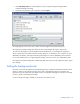
Callout Interface item Description
1 Tool bar
Enables you to select the operations that
are performed on objects that have been
placed on the map.
2 Configuration tree
Displays categories of objects and
sensors that can be placed on the map.
3 Object window
Enables you to select objects from this
window to place on the map.
4 Map window
Displays the map and graphic
representation of objects.
5
Status and
information
Lists information messages about
selected items and processes.
6
Zone and network
tree
Displays objects in each zone or
network in a hierarchy view.
7 Property window
Lists properties of the currently selected
object on the map. If you select multiple
objects, only common properties
appear.
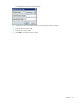
Selecting the user level
The two user levels are: