
Insight Environmental Configuration User Guide





Creating a project 58
2.
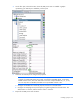
Select the PUE Reporter icon.
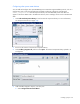
3. On the floor plan, select a location for the object. A graphic representing the PUE reporter is added
to your floor plan.
4. Add additional PUE calculation objects to your floor plan and associate them to the PUE reporter or
calculation group.
5. Export the project ("Exporting the configuration file" on page 96) to begin collecting data for PUE
calculations.
Adding power calculations
NOTE: PUE objects are symbolic and do not represent a physical device within the data
center.
You can use several methods for calculating the power consumption of the data center. You can add
more than one power calculation object to your floor plan. The following power calculation objects are
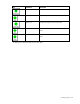
available:
Icon Calculation Description
Math operation
A basic math calculation object that aggregates
associated power sources on two sets of values, using
multiple inputs to each input set. You must configure
both the main math operation and in the input set
operation, such as sum or average.