
Insight Environmental Configuration User Guide





Creating a project 54
Configuring other power meter devices
You can add and configure other (non-ION6200) power meters that support Modbus protocol, such as a
multi-function meter, within the HP Insight Environmental Configurator software by uploading the
modbus_integrator.dcl external component library. The non-ION6200 power meter does not
appear on the Power Meters tab in the Observer software, but its readings can be used to calculate PUE
data.
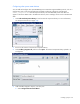
1. Select File>Load Component Library to load an external component library. For more information,
see Component libraries (on page 100).
2. Browse to the location of the external component library.
3. Select modbus_integrator.dcl, and then select Open. The external component library uploads in to
Configurator.
4. Add a Modbus Integrator object to your floor plan.
a. Select Configurations>General>Wired.