
Insight Environmental Configuration User Guide





Creating a project 53
4.
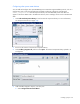
On the floor plan, select the location where the ION power meter is installed. A graphic
representing your ION object is added to your floor plan.
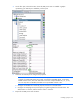
5. Select the new ION object to configure the properties.
NOTE: The ION meter Modbus ID must match the physical connection of the ION meter. For
example, if multiple ION meters are serially connected using RS485 cables, on the same
RS485 channel or bus, then each ION meter must have a unique Modbus ID (1, 2, 3, etc.)
You can only have one Modbus/TCP data source per RS485 channel or bus.
a. Configure the Modbus ID to match the physical connection on the ION meter.
b. Configure the Sampling Interval, the frequency for gathering data from the ION meter. The
default value is 5 minutes, and the minimum value is 3 minutes.
6. Repeat for all ION power meter locations.