
Insight Environmental Configuration User Guide






Creating a project 50
NOTE: You must have a Modbus/TCP Network data source in order to add this object to
your floor plan. For more information, see Creating a Modbus/TCP data source (on page
19).
To add a BCMS panel sensor object to your floor plan:
1. Select the Modbus/TCP data source and specific Grouping where you want to add the BCMS panel
object.
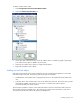
2. Select Configurations>Power & Energy>Wired>BCMS.
3. Select the Square D BCMS Panel icon.
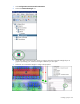
4. On the floor plan, select the location where the BCMS sensor is installed. A graphic representing
your BCMS object is added to your floor plan.
NOTE: The BCMS Modbus ID must match the physical Device ID DIP switch setting on the
BCMS main circuit board. For example, if multiple BCMS modules are serially connected
using RS485 cables on the same RS485 channel or bus, then each BCMS module must have
a unique Modbus ID (1, 2, 3, etc.) You can only have one Modbus/TCP data source per
RS485 channel or bus.