
Insight Environmental Configuration User Guide






Creating a project 47
2.
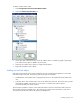
Select the 3-Collar CT icon.
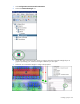
3. On the floor plan, select the location where the 3-collar CT sensor is installed. A graphic
representing your sensor is added to your floor plan.
4. Select the 3-collar CT object to configure the properties.
5. Repeat for all 3-collar CT sensor locations.
Adding a single-flow energy meter object
A single-flow energy meter measures the difference of temperature between a water pipe inlet point and
outlet point, as well as the water flow rate, to determine the amount of energy consumed.
To add a single-flow energy meter object to your floor plan:
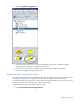
1. Select Configurations>Power & Energy>Wireless.