
Insight Environmental Configuration User Guide






Creating a project 42
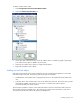
To add an outdoor sensor object:
1. Select Configurations>Environmentals>Wireless>Other.
2. Select the Outdoor Temp/Humidity icon.
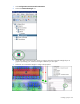
3. On the floor plan, select the location where the outdoor sensor is installed. A graphic representing
your outdoor sensor object is added to your floor plan.
4. Select the new outdoor sensor object to configure the properties.
5. Repeat for all outdoor sensor objects.
Adding a wired rack object
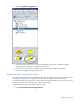
Rack objects represent the sensor arrays installed on the rack to measure the temperature on the intake
and exhaust sides of the rack. The following rack object types are available:
• Standard Rack—The standard rack is equipped with sensors on the intake and exhaust sides of the
rack.
• Cold Only Rack—The rack has sensors only on the intake side of the rack. This sensor string can also
optionally be installed at the end of a row of racks or on a data center wall to measure
environmental data in a specific location.
The wired rack includes five sensors on the intake side and five sensors on the exhaust side of the rack.
The rack does not have a humidity sensor. The sensor string connects to the base station, which then is
connected with the Ethernet cable to the gateway and Edge server.