
Insight Environmental Configuration User Guide






Creating a project 41
3.
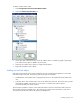
On the floor plan, select the location where your CRAH sensors are installed. A graphic representing
your CRAH/CRAC sensor object is added to your floor plan.
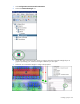
4. Select the new CRAH/CRAC object to configure the properties for the object.
5. Repeat for all CRAH/CRAC locations.
Adding a pressure sensor object
A pressure sensor object measures the difference in pressure between two areas. Typically, the high
pressure side of the sensor is installed under the subfloor and the low pressure side of the sensor is
installed above the floor.
To add a pressure sensor object:
1. Select Configurations>Environmentals>Wireless>Other.
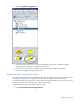
2. Select the Pressure icon.
3. On the floor plan, select the location where the pressure object is installed. A graphic representing
your pressure object is added to your floor plan.
4. Select the new pressure object to configure the properties for the pressure object.
5. Repeat for all pressure objects.
Adding an outdoor sensor object
An outdoor sensor object measures the temperature and humidity in an outdoor location.