
Insight Environmental Configuration User Guide




Creating a project 40
6.
Rotate the rack ("Rotating the rack orientation" on page 85), if necessary.
7. Repeat for all wireless rack sensor locations.
Adding a CRAH/CRAC object
There are several CRAH/CRAC sensor configurations:
• CRAH Temp—A single CRAH base station with two external sensors that measure the temperature of
the CRAH supply and return air.
• CRAC Temp/Hum—A single CRAH base station with two external sensors that measure the
temperature of the CRAH supply and return air, the humidity, and the calculated dewpoint.
• CRAC Temp/Hum (Dual)—This object consists of two CRAH base stations. One CRAH base station
with six external sensors is installed at the return air plenum to calculate the average return
temperature and measure return air humidity. The other CRAH base station is installed at the supply
air plenum, and measures the supply temperature, supply humidity, and calculated dewpoint.
To add CRAH sensor object to your floor plan:
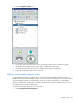
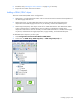
1. Select Configurations>Environmentals>Wireless>CRAC/CRAH.
2. Select either the CRAH Temps, CRAC Temp/Hum, or CRAC Temp/Hum (Dual) icon.