
Insight Environmental Configuration User Guide




Creating a project 38
7.
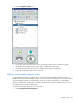
Select the new Modbus integrator object to configure the properties for the non-ION power meter.
a. Name the Modbus integrator according to the type of non-ION power meter it is supporting.
b. Verify that the Data Type and Scaling Factor properties are configured according to the device
capabilities.
c. Adjust the LSW ModBus Register and MSW ModBus Register properties to match your desired
wording of a 32-bit register, by swapping data point values, if necessary.
8. Repeat for all non-ION power meters.
Adding environmental objects
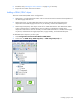
Environmental objects measure temperature, humidity, and air pressure around the data center. There are
three types of environmental objects:
• Wireless
• Wired
• Containment
Environmental objects are added to a zone ("Creating zones" on page 24).