
Insight Environmental Configuration User Guide




Creating a project 34
2.
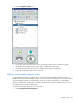
Select the PDU icon.
3. On the floor plan, select the location where you want to place the virtual PDU object. A graphic
representing your PDU object is added to your floor plan.
4. Select the new virtual PDU object to configure the properties.
5. Associate one or more PDU devices to the virtual PDU object.
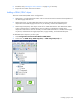
a. Right-click a PDU device, and then select Associate.
b. Select the PDU sensor you want to associate the PDU device to. The Select Association Type
window appears.